Validation
Required answers, lengths, ranges and patterns, checked on the server too.
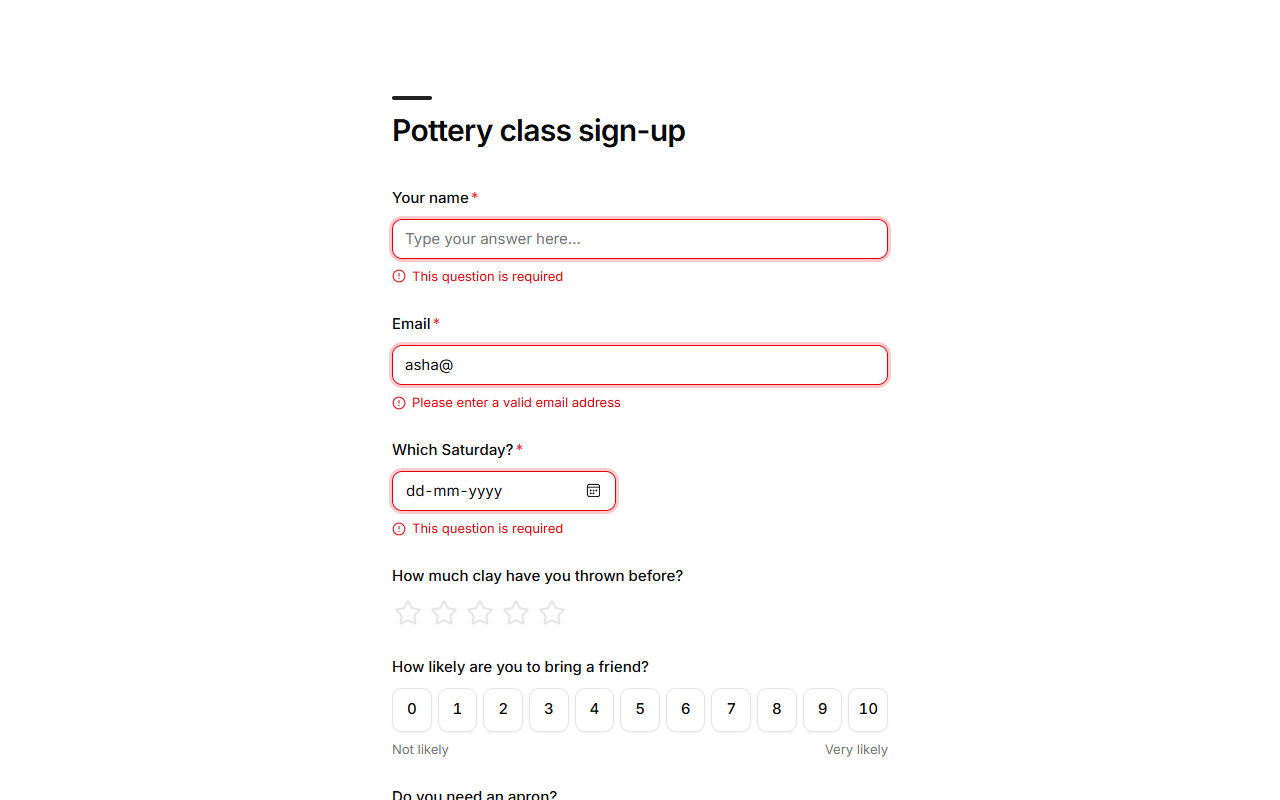
Validation stops wrong answers before they're sent. It runs in the respondent's browser, so they see the problem straight away, and again on the server, so nothing bypasses it.
Built in
| Rule | Applies to | Message |
|---|---|---|
| Required | Every question | "This question is required" |
| Looks like an email | "Please enter a valid email address" | |
| Is a number | Number | "Please enter a number" |
| One of the options | Choices | Answers that aren't options are refused. |
Your own rules
Open a question's Validation settings:
| Setting | Applies to | Example |
|---|---|---|
| Min length / Max length | Short and long text | At least 20 characters for a description. |
| Minimum / Maximum | Number | Between 1 and 10 guests. |
| Pattern | Short text, phone | A postcode, a membership number. The whole answer must match. |
| Error message | Any of the above | "Enter your 6-digit PIN code". |
Good to know
- Add a rule only where it protects your data. Every extra rule is a chance to turn away a real answer.
- Form structure is checked too: every save is validated on the server, so a form can't be saved in a shape that would break for respondents.