Editing with the agent
Ask for changes; only what you name changes, and past answers stay attached.
Once a chat is attached to a form, every request is a change to that form, and only what you ask for changes.
Ask for a change
Open the form's chat (from the agent card's link, or Agent with the form attached) and say what you want. In the builder, Ask the agent for a change… in the dock opens the same chat in a panel beside the page (a sheet on a phone), and changes land on the canvas without leaving the builder.
- "Add a required phone number question after the email."
- "Make the second step optional."
- "Use a darker, more premium look."
- "Rename 'Comments' to 'Anything else?' and make it optional."
- "Turn on the AI follow-up for 'How was your stay?', asking why when it's low."
- "Charge a ₹500 registration fee." (The agent sets the fee and takes payments; it doesn't add a question for people to type the amount.)
- "Publish it."
What you see
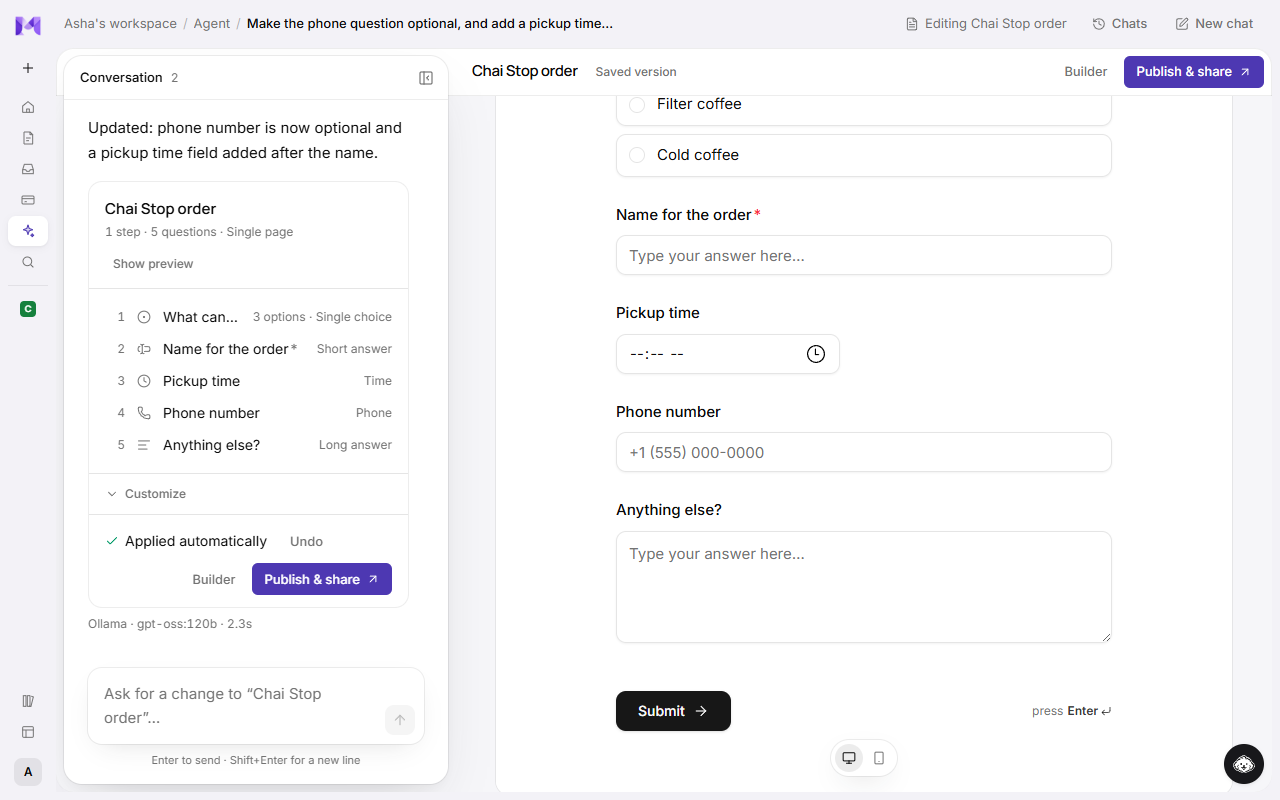
- A list of changes, not a whole new form: each added, changed or removed question, and any settings. Hover a change to outline its question in the preview.
- Tags on the preview: each added question carries a New tag and each changed one a Changed tag (hover it for what changed). The top bar counts them, like "2 new · 1 changed".
- Applied automatically when the change only adds or changes questions: it's saved straight away, with Undo beside it. Removing questions (their answers would come apart from them), publishing, or turning it into a new form waits for your click on Apply changes.
- On a live form, applied changes wait for Publish changes before customers see them.
- Publish & share publishes the form, then opens its share link. In the builder it publishes in place and shows Published · Share.
To ask about one question, click it in the preview and type into the bar that opens under it.
Design in the top bar opens the builder's Design panel beside the preview: colours, type, shape, component libraries (per part too), app settings and payments. On a saved form, changes save as you go. On a draft they show in the preview and are kept when you create or apply it.
What's kept
- Untouched questions stay exactly as saved: labels, options, settings and their place.
- Past answers stay attached. Questions keep their identity through edits, so responses you already have still line up with the right question.
- Steps stay tidy: asking for a step that already exists reuses it, and once the form has questions, empty steps are removed instead of showing customers a blank screen.
- Your manual edits made in the builder since the chat began are respected; the agent works from the form as it is now.
If something can't be applied
If a change refers to a question that isn't there, or would leave the form invalid, the agent corrects it once. Anything it still can't apply is reported, and the rest of the form is left as it was.
Live forms
On a published form, an applied change is saved but not yet public. Respondents keep the published version until you click Publish changes or ask the agent to publish. See Versions.