Confirmation email
Thank respondents by email at the address they gave, within daily limits.
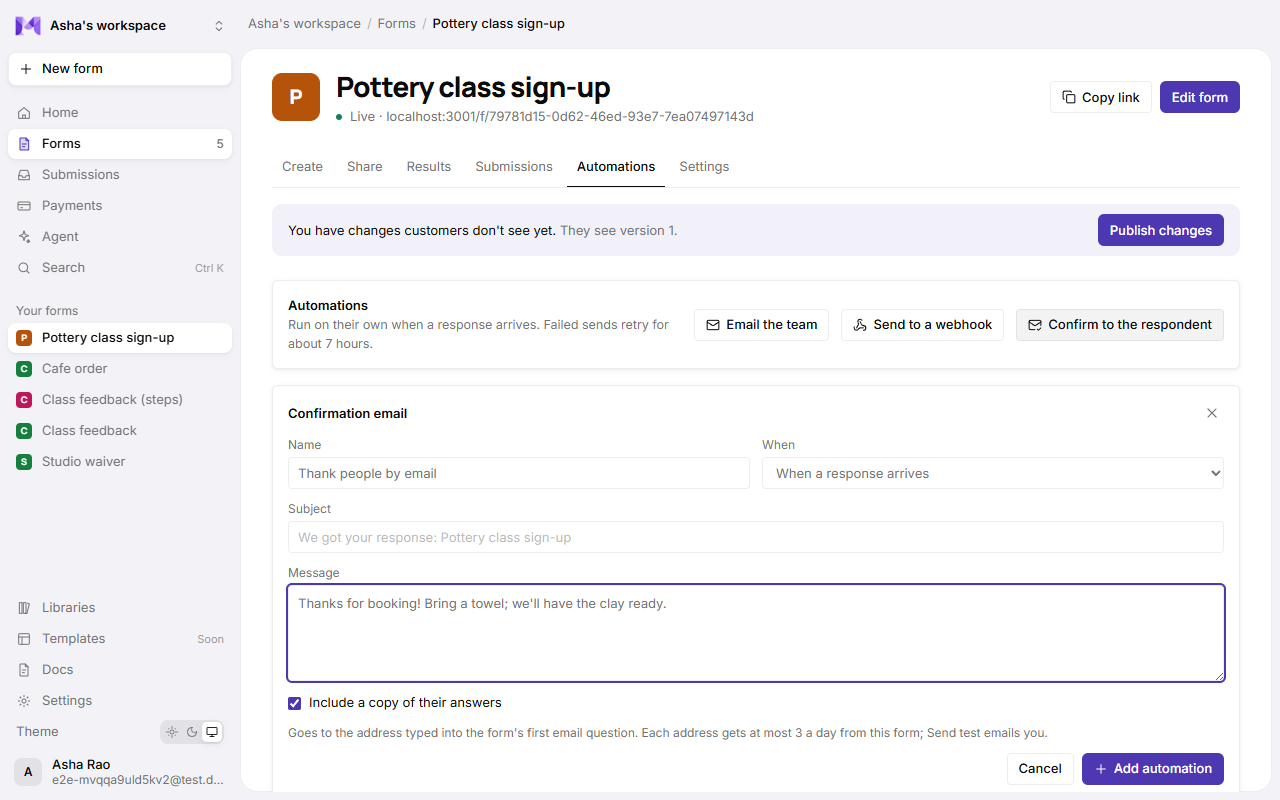
Thank the person who filled in your form with an email of your own, sent to the address they typed in. They can include a copy of their answers.
Set it up
- The form needs an Email question. The confirmation goes to the address typed into the first one.
- Open the form's page → Automations → Confirm to the respondent.
- Choose When: When a response arrives, or When an order is paid (forms that take payments).
- Write a Subject and a Message, or leave them empty for "We got your response: form name" and "Thanks for filling in form name. We got your response."
- Keep Include a copy of their answers on to list every answer under its question, or turn it off.
- Click Add automation.
Send a test
Send test emails the confirmation to you, the person who clicked it, marked [Test]. It never goes to a respondent.
Limits
So a public form can't be used to email strangers:
- One address gets at most 3 confirmations a day from the same form.
- A workspace sends at most 300 confirmations a day across all its forms.
A confirmation that would pass a limit isn't sent. Its History row says Gave up with the reason, and it isn't retried. A response with no email address is recorded the same way.
Good to know
- Sends that fail for other reasons (the mail server is down) are retried like any automation. See Email the team.
- Mikxx keeps only a scrambled fingerprint of each address it confirmed to, for the limits, and deletes it after 2 days.
- Paid orders also get a receipt on their own; a confirmation is for your own words.