Payments
Razorpay or direct UPI, prices worked out on the server, and receipts.
Any form or app can take money: a fixed fee, priced options, quantities, or an amount the customer chooses (donations, tips). Customers pay right after submitting.
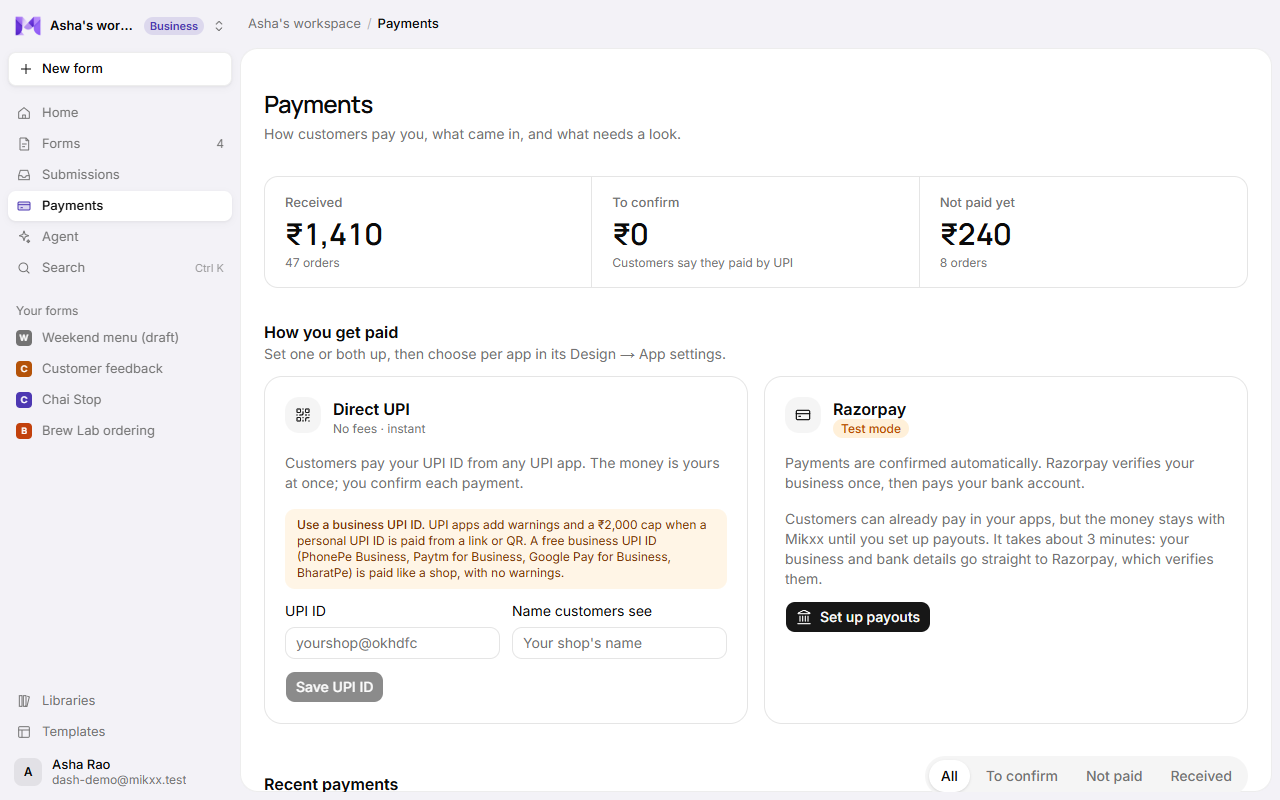
Two ways to get paid
| Method | How customers pay | Money goes | Confirmation |
|---|---|---|---|
| Direct UPI | A QR code or UPI link straight to your UPI ID, from any UPI app. | Straight to you, at once, no fees. | The customer sends their UPI reference; you confirm it once you see the money in your bank app. |
| Razorpay | Cards, UPI, netbanking, wallets in Razorpay's checkout. | To your bank account, minus Razorpay's fee and Mikxx's platform fee. | Automatic: the order is marked paid when Razorpay confirms it. |
Set one or both up on the Payments page, under How you get paid. See Payouts.
Turn payments on for a form
In the builder, open Design from the dock and switch on Take payments under Payments. Choose the method and the currency (₹ INR by default; USD, EUR, GBP, AED and SGD on Razorpay). Or ask the agent: "people pay ₹500 to register".
What customers pay
The amount is always worked out on the server, from your prices, never from the customer's browser:
- a fee everyone pays ("Registration fee ₹500"),
- prices on options, including options from a list,
- an amount to pay question for donations or tips.
The price is kept with each order, so later price changes never alter a past order.
The Payments page
Open Payments in the sidebar to see what came in and what needs you.
Three totals across the top. Click one to show only those payments; click it again to show all:
| Total | What it counts |
|---|---|
| Received | Money that's in: paid by Razorpay, or UPI payments you've confirmed. |
| To confirm | Customers say they paid by UPI and are waiting for you. A dot appears when there are any. |
| Not paid yet | Orders submitted but not paid. |
Recent payments lists every order, newest first, with the customer (or Guest), the form, when, the method, the UPI reference or Razorpay payment ID, the amount, and its state:
| State | Meaning |
|---|---|
| Received | Paid. |
| To confirm | The customer sent a UPI reference. Check your bank app for it. |
| Not paid | Submitted, not paid. |
| Cancelled | The order was cancelled (a booking cancelled, say), so nothing is owed. |
The All, To confirm, Not paid and Received tabs above the list filter it too.
Confirm a UPI payment
When you see the money in your bank app, click Confirm received on its row. The order moves to Received and the customer's receipt goes out. The same action shows as Confirm UPI on an order in the form's board and in Needs you on Home.
Mark an order paid
Someone paid in cash or another way? Click Mark paid on a Not paid order.
Details on any row opens the order in Submissions.
Only owners and admins can confirm payments or mark orders paid.
Receipts
When an order is paid, the customer gets an emailed receipt: the amount, each item, the reference and the method. It goes to their sign-in email in an app, or the form's email question. A paid form needs an email question for this.
Good to know
- Direct UPI is for ₹ only, up to ₹1,00,000 a payment. The QR code expires after 10 minutes, and the thank-you screen waits until they've paid.
- Until you set up a way to get paid, How you get paid sits at the top of the Payments page; after that the money comes first and setup moves below it.
- While Razorpay runs on test keys, its card shows Test mode, and no real money moves.
- Each form's Payments tab shows the same history for just that form.
- You're the seller: show customers your own refund policy, and refund them yourself. Razorpay refunds go back to the customer's payment method; Direct UPI payments can only be returned by sending UPI back. See the Refund and cancellation policy and Terms.
- To run something when an order is paid (email your team, update another system), see Automations.