Drop-off and funnels
Where people leave your form: opened, started, each screen, sent.
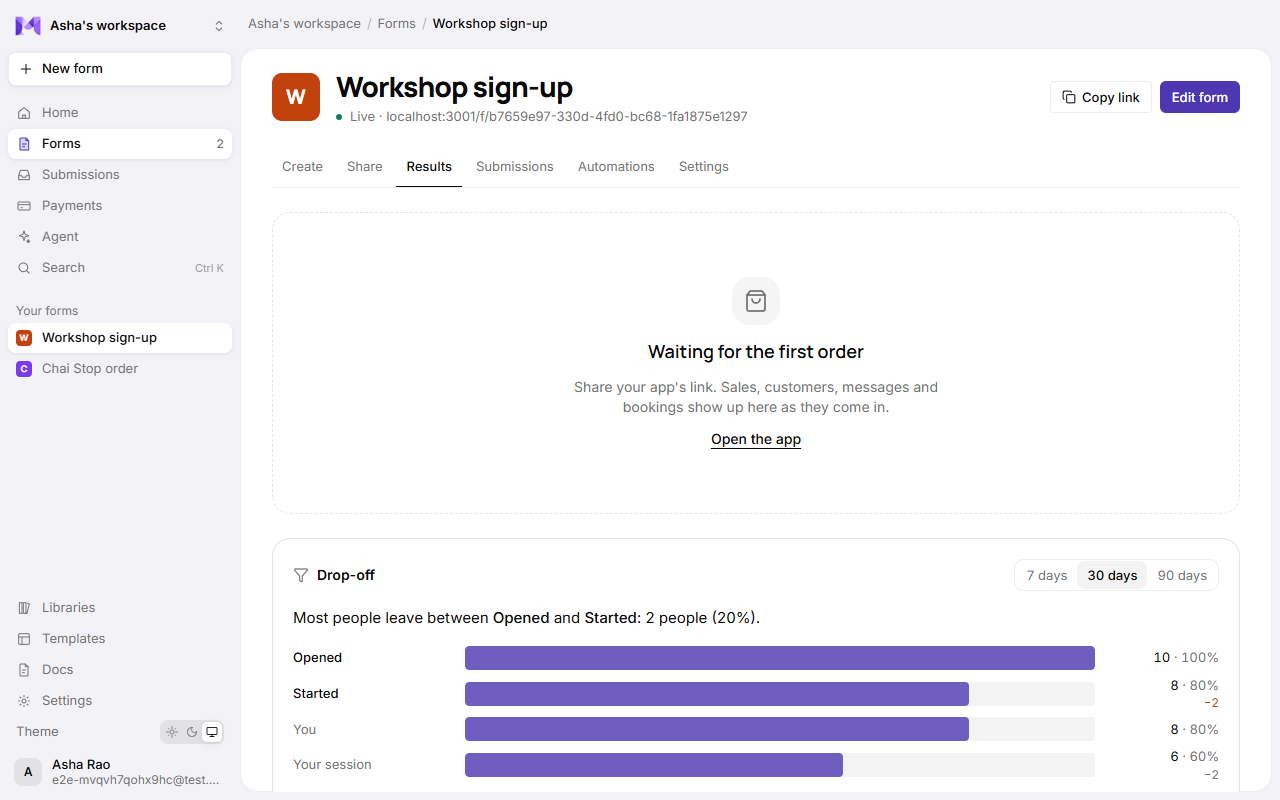
See where people leave your form: how many opened it, how many started answering, how far they got, and how many sent it. Find it on the form's page → Results → Drop-off.
What you see
| Stage | Counts the visits that |
|---|---|
| Opened | Loaded the live form. |
| Started | Answered at least one question. |
| Each screen | Reached that step (multi-step forms) or that question (one question at a time). |
| Sent | Sent their response. |
Each stage shows how many visits reached it and their share of everyone who opened the form, with how many were lost since the stage before. Above the bars, one line says where the most people leave, for example "Most people leave between Class and Payment: 4 people (67%)". That's the first place to look: a question there may be unclear, too personal, or asking too much too soon.
Choose 7 days, 30 days or 90 days.
A single-page form (and a mini app) has no screens of its own, so its funnel is Opened, Started and Sent.
What counts as a visit
- One opening of the live form's page. Someone who opens it twice counts twice.
- Previews in the builder never count, and neither do draft forms.
- Nothing about the person is kept: no address, no answers, no name. A visit is a random number the browser makes when the page opens.
- Visits are kept for 180 days.
Good to know
- Steps and questions are counted as customers see them, in the published version. If you reorder or rename them and publish, the new names show; past visits keep the place they reached.
- Going back never lowers how far a visit got.
- Someone who skips questions that don't apply to them still counts as reaching the screens in between.