Payouts
Set up your UPI ID or your Razorpay payout account.
Tell Mikxx where your money goes on the Payments page, under How you get paid. Set up one method or both; each card shows Ready once it can take payments. (Settings → Getting paid points here too.)
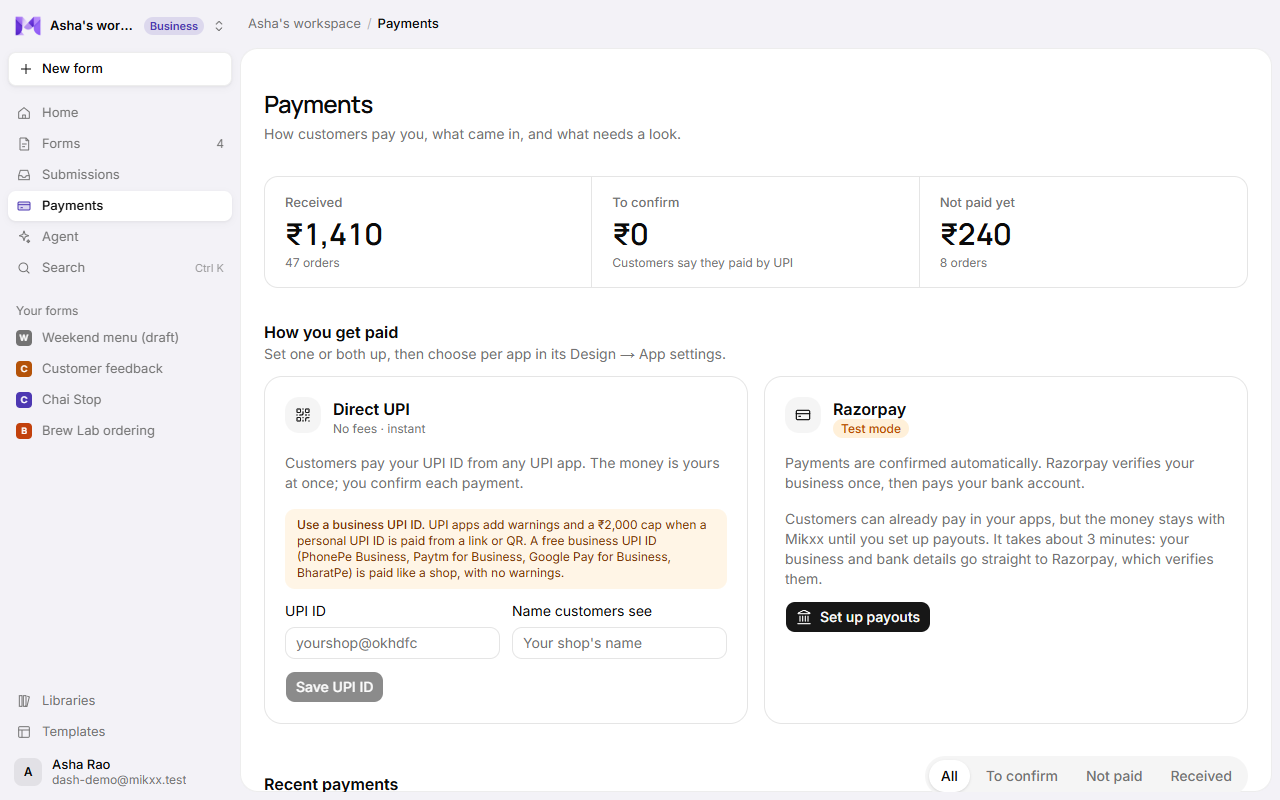
Direct UPI
No fees, and the money is yours at once. Enter your UPI ID (like yourshop@okhdfc) and the
Name customers see (your shop's name), then Save UPI ID. Customers then pay you straight
from their UPI app. Nothing passes through Mikxx. You confirm each payment when it reaches your
bank; see Payments.
Use a business UPI ID. UPI apps show customers a warning, and cap payments at ₹2,000, when a personal UPI ID is paid from a link or QR code. A free business UPI ID (PhonePe Business, Paytm for Business, Google Pay for Business, BharatPe) is paid like a shop, with no warnings.
Razorpay
Cards, UPI and netbanking, confirmed automatically. Razorpay verifies your business once, then pays your bank account. Click Set up payouts on the Razorpay card; it takes about three minutes, and your details go straight to Razorpay:
- Your business type (individual, partnership, private limited…), then your Category and Subcategory from Razorpay's list, in plain words: pick the category first (Food and drink, Education, Services, Healthcare…) and the subcategory narrows to it (Bakeries and home bakers, Coaching, Barber, salon and beauty…). Razorpay needs both to review your business.
- Your legal business name, business PAN, and GST if you have it.
- Your address and mobile number.
- Your bank account: account holder name (as on the account), account number and IFSC.
Razorpay reviews the details. The status shows Needs your input, then Active once you can take payments. Each payment's share is moved to your bank account by Razorpay, minus their fee and Mikxx's platform fee for your plan:
| Plan | Mikxx's platform fee on Razorpay payments |
|---|---|
| Free | 1% |
| Pro | 0.5% |
| Business | None |
The Razorpay card on the Payments page shows your plan and its fee. Direct UPI never has a fee.
Good to know
- Only workspace owners and admins can change payout details.
- Until Razorpay is active, forms can't switch on Razorpay payments; Direct UPI works as soon as your UPI ID is saved.
- On test keys the Razorpay card shows Test mode, and no real money moves.
- Razorpay won't activate businesses on its prohibited list (gambling, crypto, adult content and others); see Terms. Your KYC details go to Razorpay, not Mikxx; see the Privacy Policy.
- Money in and payment history are on the same Payments page.