Choice displays
Lists, pills, cards, plans, emoji, switches and dropdowns, and when to use each.
A single-choice question can look several ways. Pick the one that suits its options in the question's Layout setting.
| Display | Looks like | Best for | Needs |
|---|---|---|---|
| List | Radio rows. | Any options; the default. | |
| Pills | Compact chips that wrap. | Short labels: sizes, days, levels. | |
| Cards | Tiles with an icon, picture and description. | A few options worth showing: services, tickets. | An icon or picture on each option. |
| Plans | Pricing cards with a price, a badge ("Most popular") and up to 6 features. | Packages and memberships. | A price on each option. |
| Emoji | A row of big emoji. | Moods and reactions. | An emoji on every option. |
| Segmented | An inline switch. | 2 to 4 short options. | |
| Dropdown | A menu. | Long lists. |
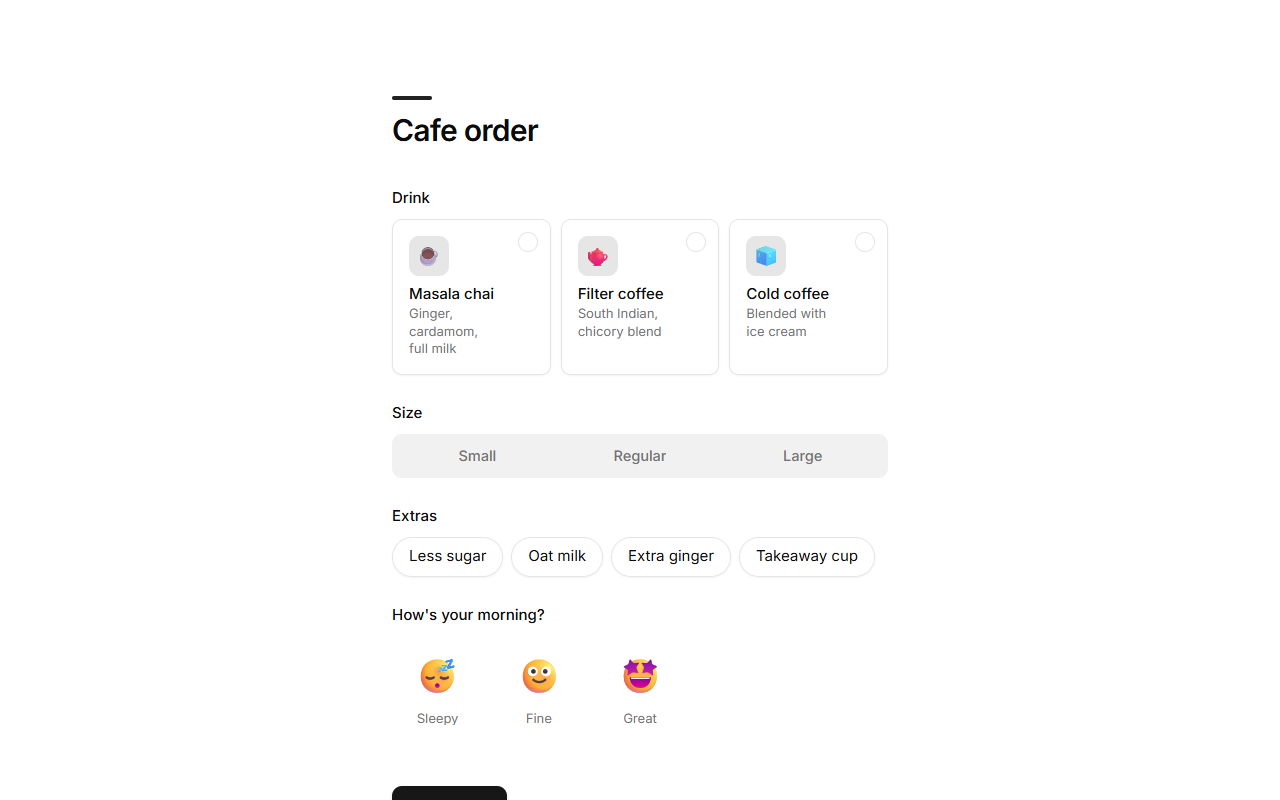
Multiple-choice questions can use List, Pills or Cards.
Option details
Each option can carry more than its label:
| Detail | Shown in |
|---|---|
| Icon (an emoji or an icon name) | Cards, emoji, plans |
| Description | Cards, plans |
| Picture (a link to an image) | Cards, plans |
| Price | Cards, plans, and the running total on paid forms |
| Badge | Plans |
| Features | Plans |
Good to know
- When the agent picks a display that wouldn't look right (cards without icons, plans without prices, more than 4 options on a segmented switch), it uses the closest one that does. A long single-choice list becomes a dropdown.
- Prices on options add up in a running total and are charged on forms that take payments. See Payments.