Publish and share
Get a public link, a QR code, and share it on WhatsApp or by email.
Publishing gives your form a public link. Anyone with it can open the form and respond until you unpublish it.
Publish
- In the builder, click Publish and confirm, or
- on the form's page, open Settings and switch Status to Live.
The first time, this saves version 1, the version people see. Later edits wait until you Publish changes. See Versions.
Share
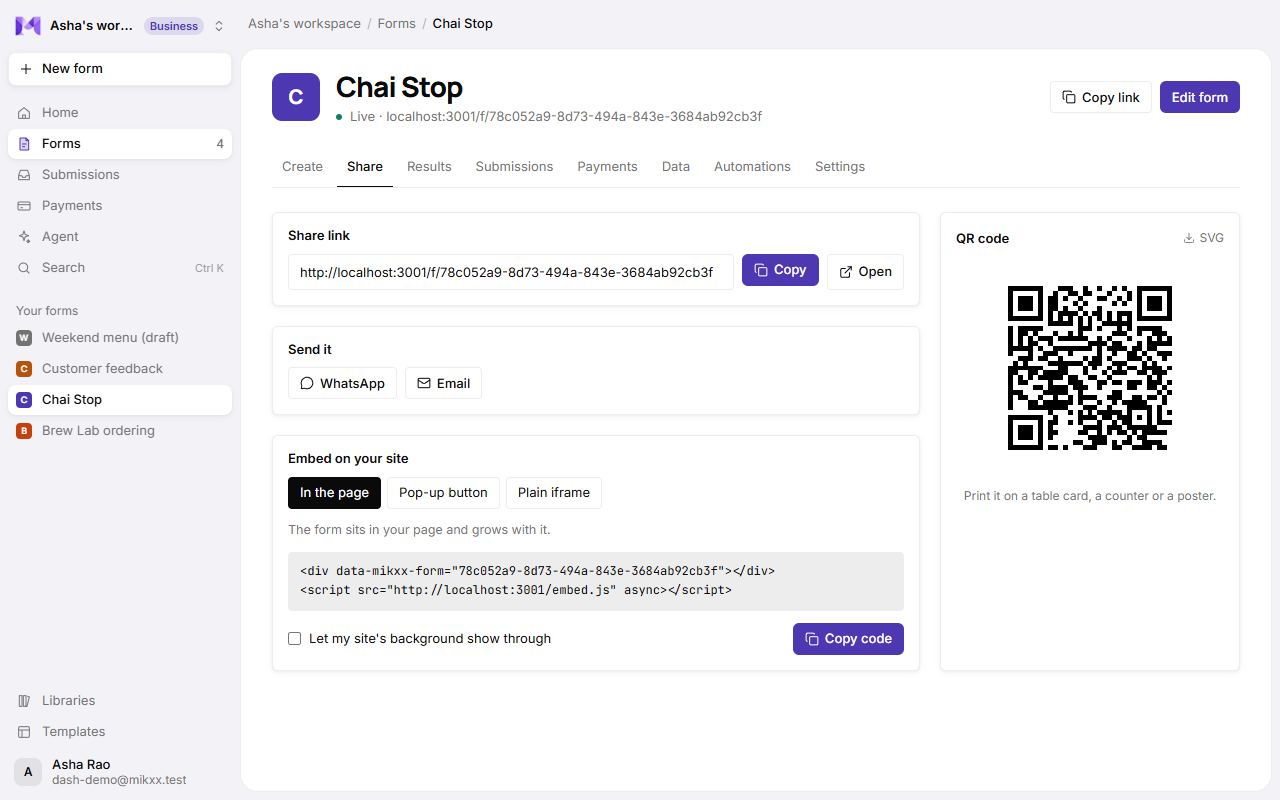
Open the form's Share tab:
| Option | What it does |
|---|---|
| Public link | Copy the link to paste anywhere. |
| Opens WhatsApp with the link ready to send. | |
| Opens your email app with the link in a new message. | |
| QR code | Download it to print on a table card, a counter or a poster. |
Unpublish or close
In the builder, open the Live menu to unpublish (back to a draft) or archive the form. Archived forms stop taking responses and keep everything they collected.
Good to know
- Drafts have no public link. Opening the link of an unpublished form shows that it's not available.
- Embedding a form on your own site isn't available yet. Share the link instead.